SPA VUE应用实现页面缓存

使用场景

在 SPA 应用中产品希望在用户在多个页面来回切换的时候,不要丢失查询的结果。

keep-alive

包裹动态组件时,会缓存不活动的组件实例,而不是销毁它们。和 相似, 是一个抽象组件:它自身不会渲染一个 DOM 元素,也不会出现在父组件链中。

实现方案

  • 整个页面缓存

采用在 router 的 meta 属性里增加一个 keepAlive 字段,然后在父组件或者根组件中,根据 keepAlive 字段的状态使用 标签,实现对 的缓存

1
2
3
4
<keep-alive>
<router-view v-if="$route.meta.keepAlive" />
</keep-alive>
<router-view v-if="!$route.meta.keepAlive" />
  • 动态缓存

使用 vuex 配合 exclude 和 include,通过 include 和 exclude 决定那些组件进行缓存。注意这里说的是组件,并且 cachedView 数组存放的是组件的名字,如下:

1
2
3
<keep-alive :include="$store.state.keepAlive.cachedView">
<router-view />
</keep-alive>

本项目的实现

  • 版本一:基于路由缓存

当前框架是嵌套的动态路由是无法动态缓存组件,并且如果使用方案一 meta 属性里增加一个 keepAlive 字段也是不支持的,只能通过维护一个缓存的 url 来实现:

1
2
3
4
5
6
7
8

// ISCACHE_ARRAY = ['url']
<keep-alive>
<router-view v-if="ISCACHE_ARRAY.indexOf($route.fullPath) !== -1" :key="$route.fullPath">
</router-view>
</keep-alive>
<router-view v-if="ISCACHE_ARRAY.indexOf($route.fullPath) === -1" :key="$route.fullPath">
</router-view>

这样是持久缓存了整个页面,问题也就出现当用户通过 tabviews 关闭页面然后从左侧打开菜单时是缓存的页面,这个不符合日常使用习惯,所以为了解决数据新鲜度的问题,看了文档发现在 keep-alive 的模式下多了 activated 这个生命周期函数,keep-alive 的声明周期执行:

  • 页面第一次进入,钩子的触发顺序
    created-> mounted-> activated,
    退出时触发 deactivated 当再次进入(前进或者后退)时,只触发 activated
  • 事件挂载的方法等,只执行一次的放在 mounted 中;组件每次进去执行的方法放在 activated 中

所以在 activated 触发查询请求就能保证数据的新鲜度。

但是使用后发现由于你切换 tab 是会请求数据,但是本项目的数据量有很大导致频繁 loading 。

  • 版本二:动态缓存

由于版本一需要频繁拉去数据导致此方案已不合适只能动态缓存。
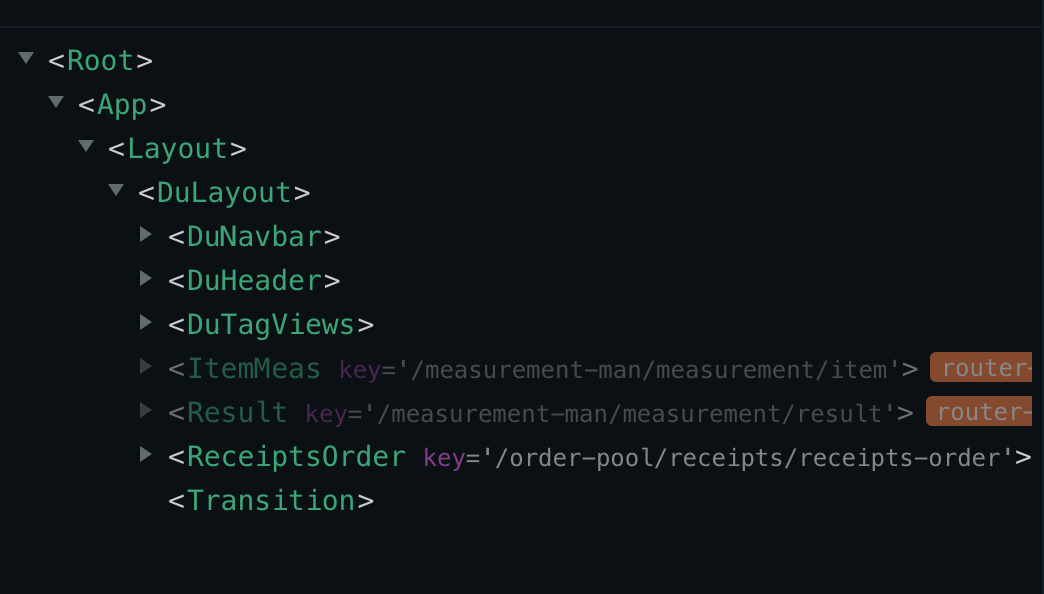
由于框架的原因,框架里把路由和菜单用同一个数据模型采用的嵌套路由是无法缓存组件的,改造前路由如下:
所以需要改造确定:左侧菜单嵌套,路由展开不嵌套的方式:
app.vue

1
2
3
<div id="app">
<Layout></Layout>
</div>

layout.vue

1
2
3
4
<keep-alive :include="cachedViews">
<router-view :key="key">
</router-view>
</keep-alive>

通过上面的修改完成动态缓存实现。

其中 cachedViews 是通过监听路由动态增加删除维护要缓存的组件数组:

1
2
3
4
5
6
7
8
9
10
11
12
13
14
15
16
17
18
19
20
21
22
23
24
25
26
27
const state = {
cachedViews: [],
}
const mutations = {
ADD_VIEWS: (state, view) => {
if (state.cachedViews.includes(view.name)) return
state.cachedViews.push(view.name)
},
DEL_CACHED_VIEW: (state, view) => {
const index = state.cachedViews.indexOf(view.name)
index > -1 && state.cachedViews.splice(index, 1)
},
}
const actions = {
addCachedView({ commit }, view) {
commit('ADD_VIEWS', view)
},
deleteCachedView({ commit }, view) {
commit('DEL_CACHED_VIEW', view)
},
}
export default {
namespaced: true,
state,
mutations,
actions,
}

通过监听路由变化:

1
2
3
4
5
6
7
8
9
10
watch: {
'$route'(newRoute) {
const { name } = newRoute
console.log(name)
const cacheRout = this.ISCACHE_MAP[name] || []
cacheRout.map((item) => {
store.dispatch('cached/addCachedView', { name: item })
})
},
},

ISCACHE_MAP 是配置每个页面要缓存的那些组件

1
2
3
const ISCACHE_MAP = {
'/receipts-order': ['ReceiptsOrder'],
}

当通过 tabview 关闭页面时清除组件名称:

1
2
3
4
5
6
7
closeTag(newRoute) {
const { name } = newRoute
const cacheRout = this.ISCACHE_MAP[name] || []
cacheRout.map((item) => {
store.dispatch('cached/deleteCachedView', { name: item })
})
},

关于展开路由是在动态路由添加时展开:

1
2
3
4
5
6
7
8
9
10
export const flatten = (data) => {
return data.reduce((arr, v) => {
if (Array.isArray(v.children) && v.children.length !== 0) {
return arr.concat(flatten(v.children))
} else {
return arr.concat([v])
}
}, [])
}
routes.addRoutes(flatten(routeList))

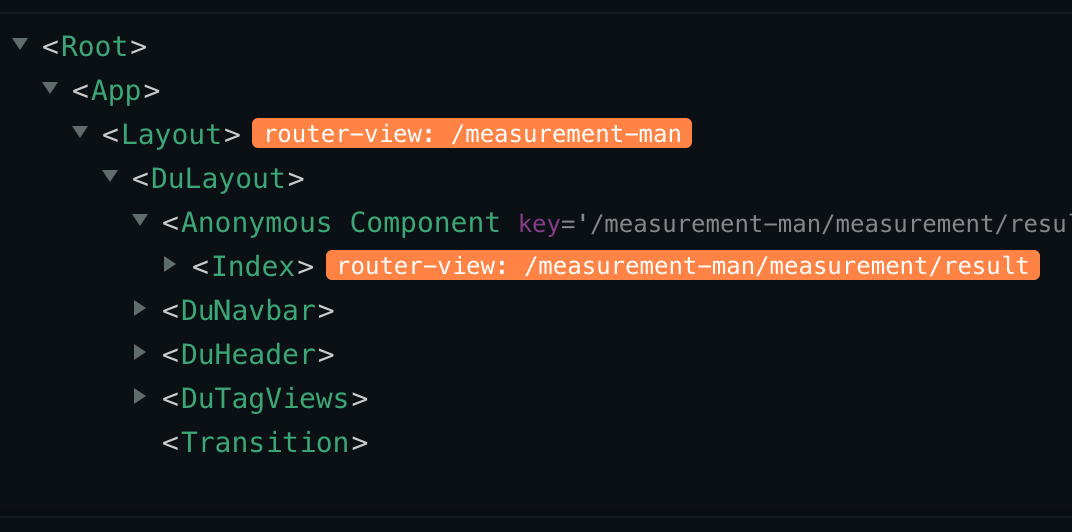
改造后的路由:

到此完美解决了当前框架的设计问题

总结

上述的常规方案网上一大把,如何将它们合理的使用在项目中,这才是我们需要多去思考的。